Report #48
Project: Lenci Test 7/3/2026
2026-03-07 11:26:57
Description
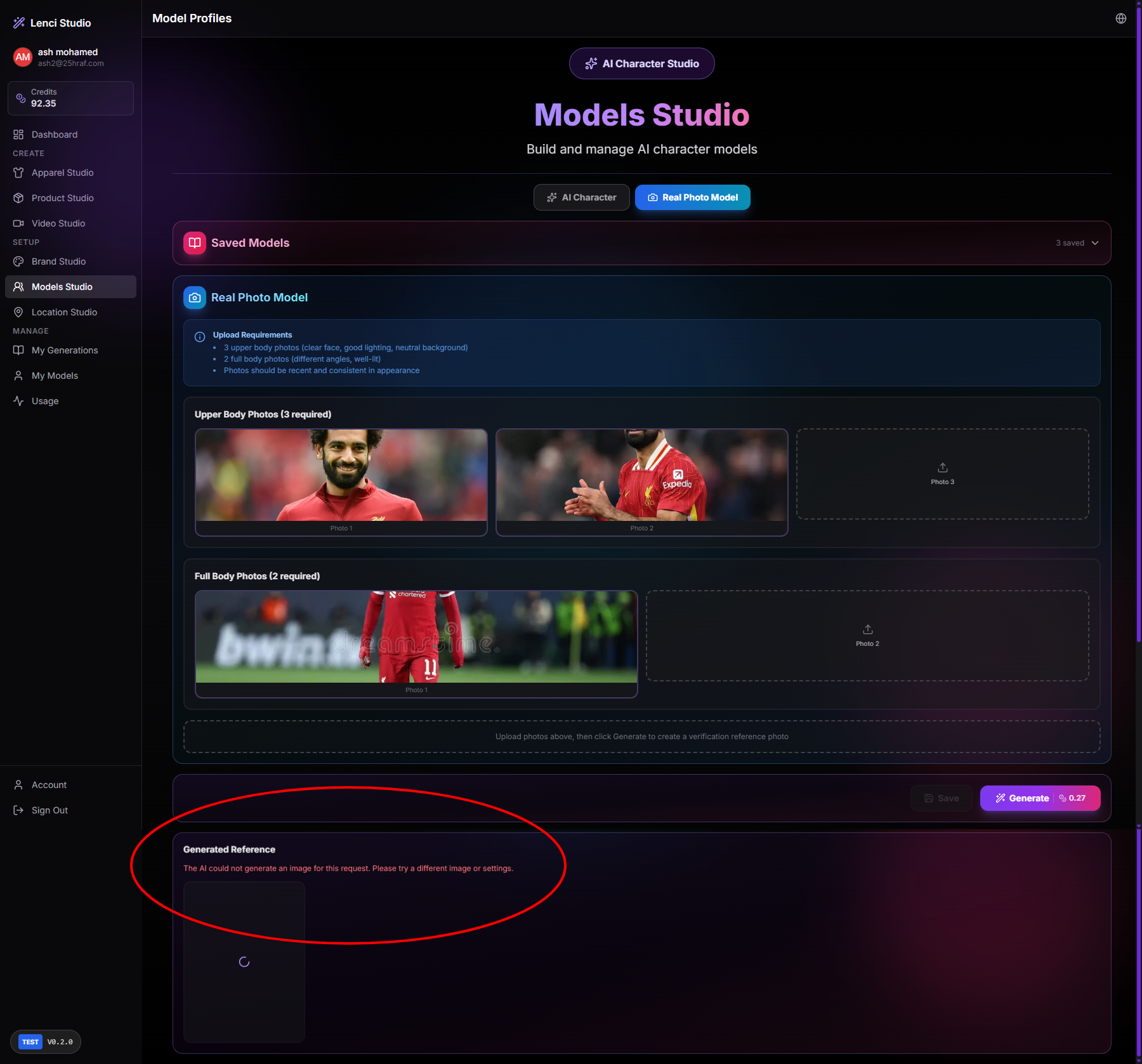
Issue description The system allows uploading .webp images in Models Studio → Real Photo Model, but the AI generation process later fails with the error: “The AI could not generate an image for this request. Please try a different image or settings.” This indicates that .webp files are accepted during upload but are not supported by the generation pipeline, resulting in a failure only after the user attempts to generate the reference image. This creates a poor user experience because: The upload appears successful. The validation failure occurs only during generation. Users receive a vague AI error instead of a clear file format validation message. Expected behavior The system should validate file formats during upload, not during generation. If .webp is unsupported, the upload should be rejected immediately with a clear error message. Only supported formats (e.g., JPG, JPEG, PNG) should be accepted for model training inputs. Acceptance criteria When a user attempts to upload a .webp image: The system blocks the upload immediately. A clear validation message appears (e.g., “Unsupported file format. Please upload JPG or PNG images.”). Unsupported files are never accepted into the upload slots. Generation cannot be triggered if any uploaded image has an unsupported format. If .webp support is later added, the system processes it correctly without causing generation failures. The upload component and backend validation enforce the same allowed file formats.
Console Output
main-p5HJAGcv.js:1108  POST https://test-lenci.siyadatech.studio/api/ai/generate 500 (Internal Server Error)
Rt @ main-p5HJAGcv.js:1108
await in Rt
(anonymous) @ main-p5HJAGcv.js:1280
await in (anonymous)
generatePhotoshootImage @ main-p5HJAGcv.js:1257
(anonymous) @ main-p5HJAGcv.js:2308
await in (anonymous)
Of @ LanguageContext-D6i996QC.js:48
(anonymous) @ LanguageContext-D6i996QC.js:48
Mu @ LanguageContext-D6i996QC.js:48
dc @ LanguageContext-D6i996QC.js:48
Tc @ LanguageContext-D6i996QC.js:49
sv @ LanguageContext-D6i996QC.js:49
Screenshots & Video