Archived Reports
Project: Lenci R1 V0.1.8
Description
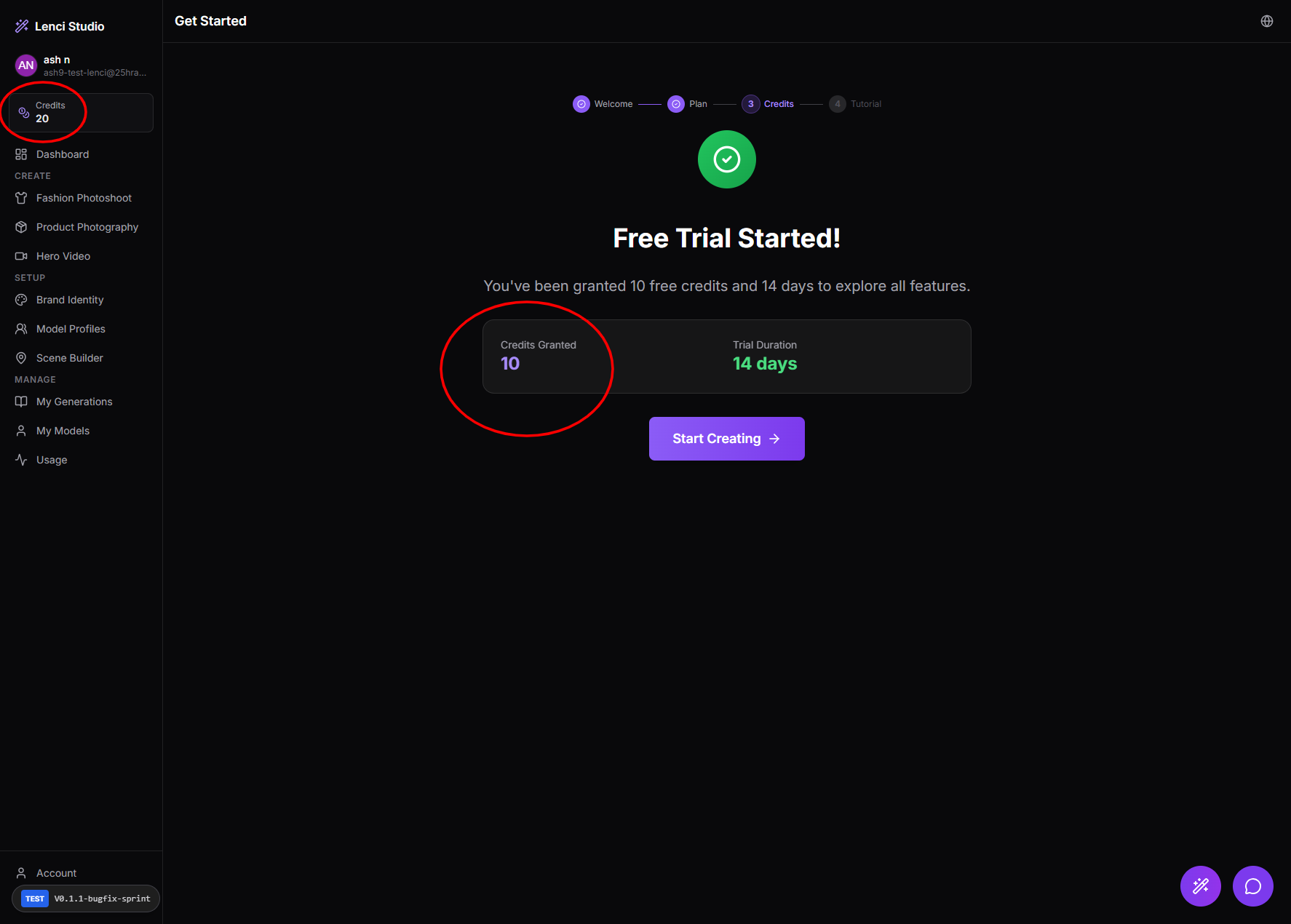
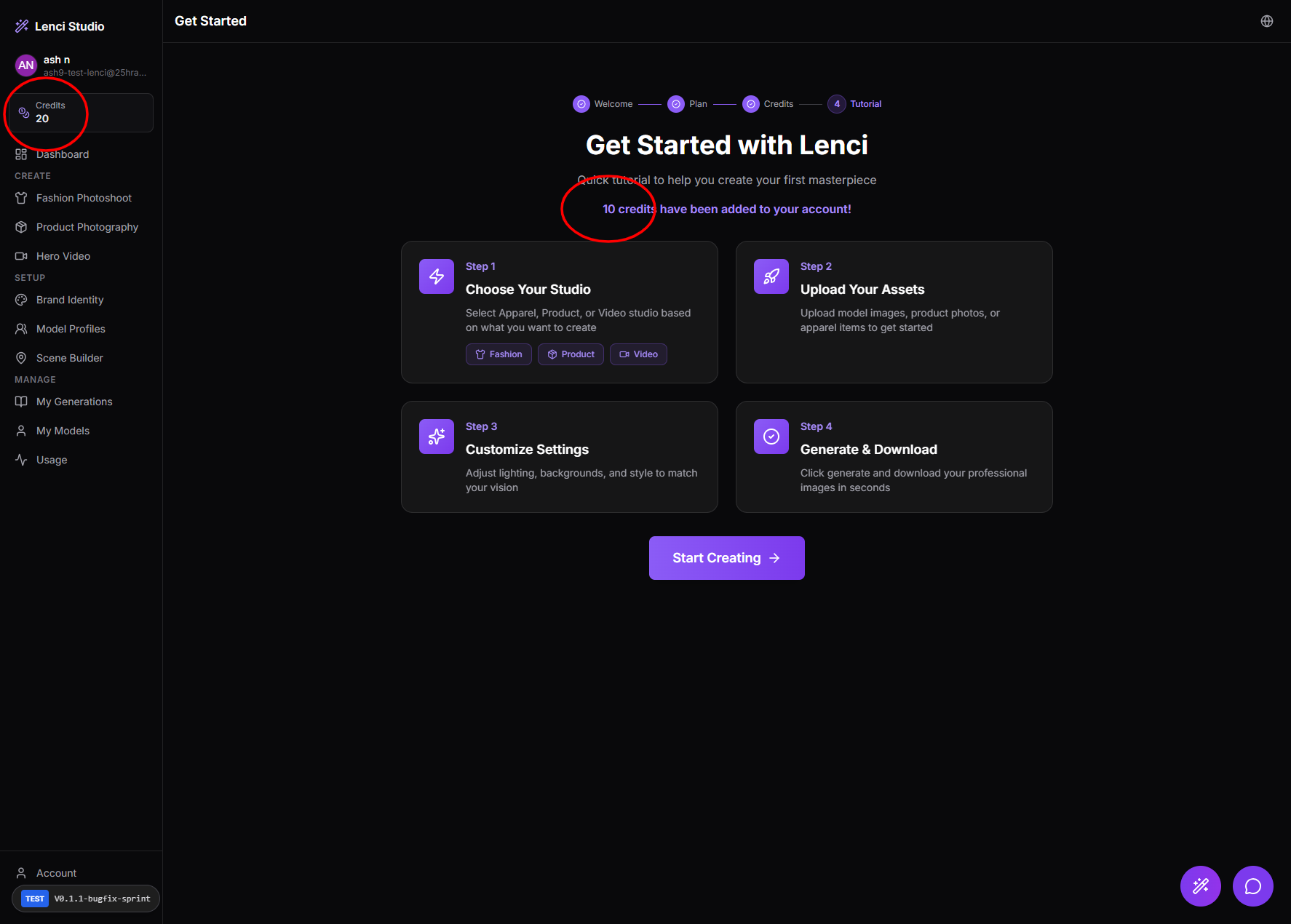
Issue description In the onboarding flow, the UI shows “10 credits granted / 10 credits have been added” on the onboarding steps, while the sidebar credit balance shows 20 for the same user/session. This mismatch appears across two consecutive onboarding steps/pages, creating confusion about the actual trial credit balance and whether credits were granted twice or the UI is out of sync. Expected behavior The onboarding “credits granted” message and the sidebar balance should always match the user’s actual credit ledger/balance. If the trial grants 20 credits, every onboarding step that references granted credits must say 20 (or use a dynamic value). If the sidebar shows the current balance (e.g., includes existing credits), onboarding copy should clearly distinguish “Granted now” vs “Current balance”—but the numbers must still be accurate based on the same source of truth. Acceptance criteria AC1 — Single source of truth: The value shown in onboarding (“credits granted/added”) is pulled from the same authoritative source as the sidebar balance (or from a clearly-defined “trial grant amount” field) and is consistent. AC2 — Correct value displayed: For a new account that receives 20 trial credits, onboarding screens display 20 (not 10) anywhere credits are referenced. AC3 — Consistency across steps: Navigating through the onboarding steps (including refresh/back/forward) never shows conflicting credit values between onboarding messaging and the sidebar. AC4 — No hardcoded copy: There is no hardcoded “10 credits” string in onboarding UI; credit numbers render dynamically based on the actual configured grant/balance. AC5 — Edge cases: If the user already had credits before onboarding (e.g., admin grant), the onboarding message either: shows the actual trial grant amount, and labels it clearly (“Trial credits granted: X”), or is hidden/skipped when not applicable—without showing incorrect numbers.
Console Output
api-CTSVC-i9.js:1 [PerformanceService] Initialized
api-CTSVC-i9.js:1 [PerformanceService] Auto-initialized, session: session_1772110761352_ajgco74ii
creditHistoryService-Qs2rnbBE.js:1 🚀 [AuthContext] Initializing authentication...
creditHistoryService-Qs2rnbBE.js:1 ✅ [AuthContext] Session found for user: ash9-test-lenci@25hraf.com
creditHistoryService-Qs2rnbBE.js:1 🔍 [AuthContext] Fetching profile for user: ash9-test-lenci@25hraf.com b449d8e3-ff56-408d-a129-e68678fb9936
creditHistoryService-Qs2rnbBE.js:1 ✅ [AuthContext] User profile loaded from API: {id: 'b449d8e3-ff56-408d-a129-e68678fb9936', email: 'ash9-test-lenci@25hraf.com', email_verified: true, display_name: 'ash n', avatar_url: null, …}
creditHistoryService-Qs2rnbBE.js:1 📊 [AuthContext] Final user profile: {id: 'b449d8e3-ff56-408d-a129-e68678fb9936', email: 'ash9-test-lenci@25hraf.com', plan: 'starter', generationsUsed: 0, creditsBalance: 10}
creditHistoryService-Qs2rnbBE.js:1 ✅ [AuthContext] User profile set in state
creditHistoryService-Qs2rnbBE.js:1 [WS] Connected
Screenshots & Video
Description
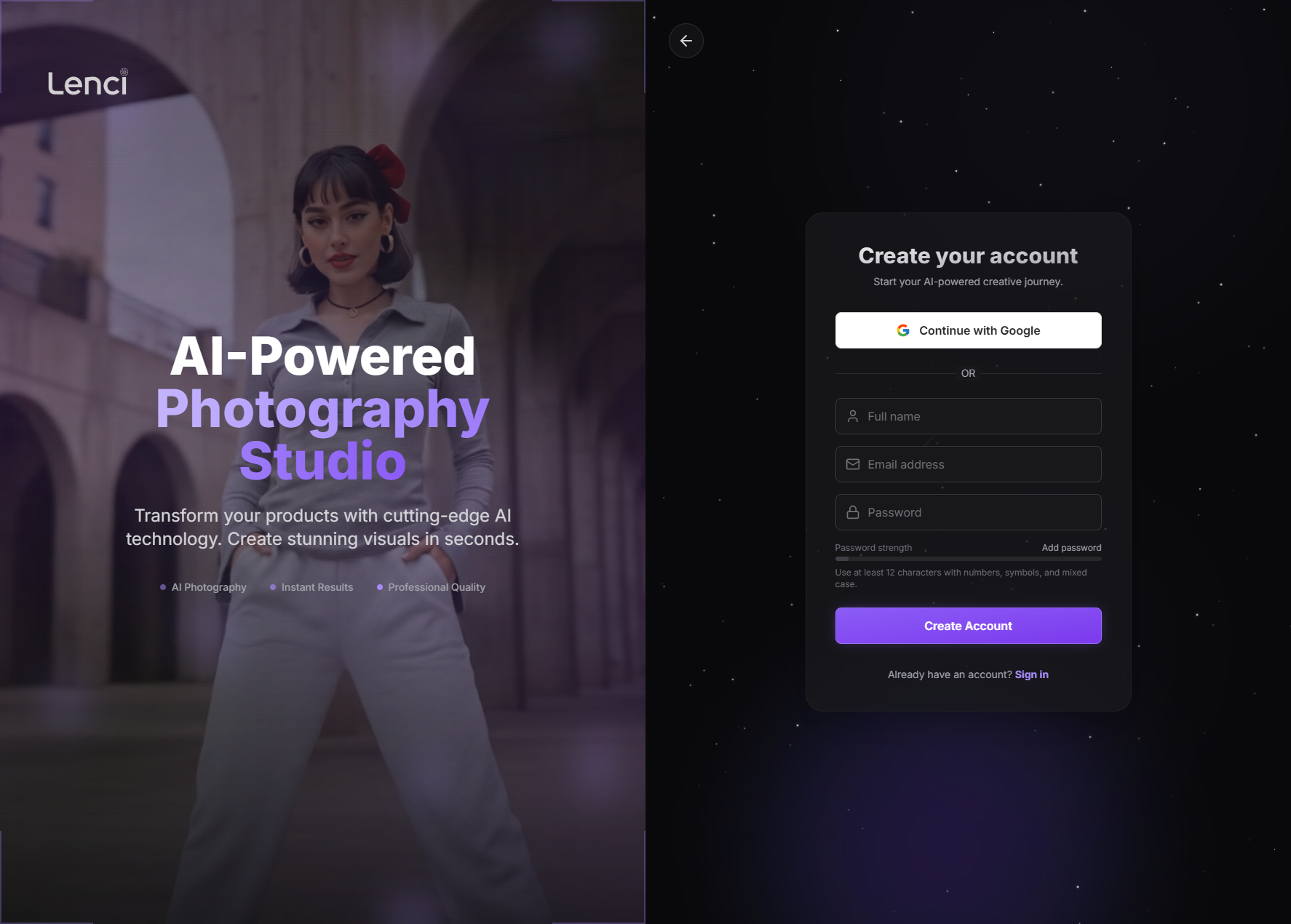
Issue Description On the Signup Page, multiple static assets (JS/CSS/images/fonts) are failing to load, resulting in: Console errors for missing files (404 / failed to fetch). Incomplete styling and layout rendering. Potential broken UI components or missing interactive behavior. Visual inconsistencies compared to the intended design. The page loads partially, but required dependencies are not being resolved correctly. Expected Behavior All required static assets for the Signup page load successfully. No 404 or failed network requests appear in the console. The layout renders fully styled with correct fonts, animations, and interactive behaviors. The page functions independently without depending on unavailable landing-page-only assets. Acceptance Criteria No 404 / failed resource errors appear in the browser Network or Console tabs when loading /signup. All CSS files are loaded and applied correctly (no unstyled components). All required JS bundles load without runtime errors. Fonts and images render properly with no fallback or missing placeholders. Page behavior (form validation, buttons, OAuth) works without console warnings or errors. The issue is reproducible before fix and fully resolved after deployment.
Console Output
signup.html:1 [DOM] Input elements should have autocomplete attributes (suggested: "current-password"): (More info: https://goo.gl/9p2vKq) <input placeholder="Password" required aria-invalid="false" class="w-full p-3 ps-11 rounded-lg bg-zinc-900 text-zinc-200 border transition-colors shadow-inner-soft placeholder:text-zinc-500 border-zinc-700/80 focus:ring-2 focus:ring-violet-500/50 focus:border-violet-500" type="password" value> signup.html:43 GET https://test-lenci.siyadatech.studio/assets/product-showcase/product-4.jpg 404 (Not Found) signup.html:43 GET https://test-lenci.siyadatech.studio/assets/product-showcase/product-5.jpg 404 (Not Found) LanguageContext-B-sxhRyK.js:91 [Violation] 'visibilitychange' handler took 183ms LanguageContext-B-sxhRyK.js:25 [Violation] 'message' handler took 223ms signup.html:1 Uncaught (in promise) Error: A listener indicated an asynchronous response by returning true, but the message channel closed before a response was received
Screenshots & Video
Issue URL
https://test-lenci.siyadatech.studio/Description
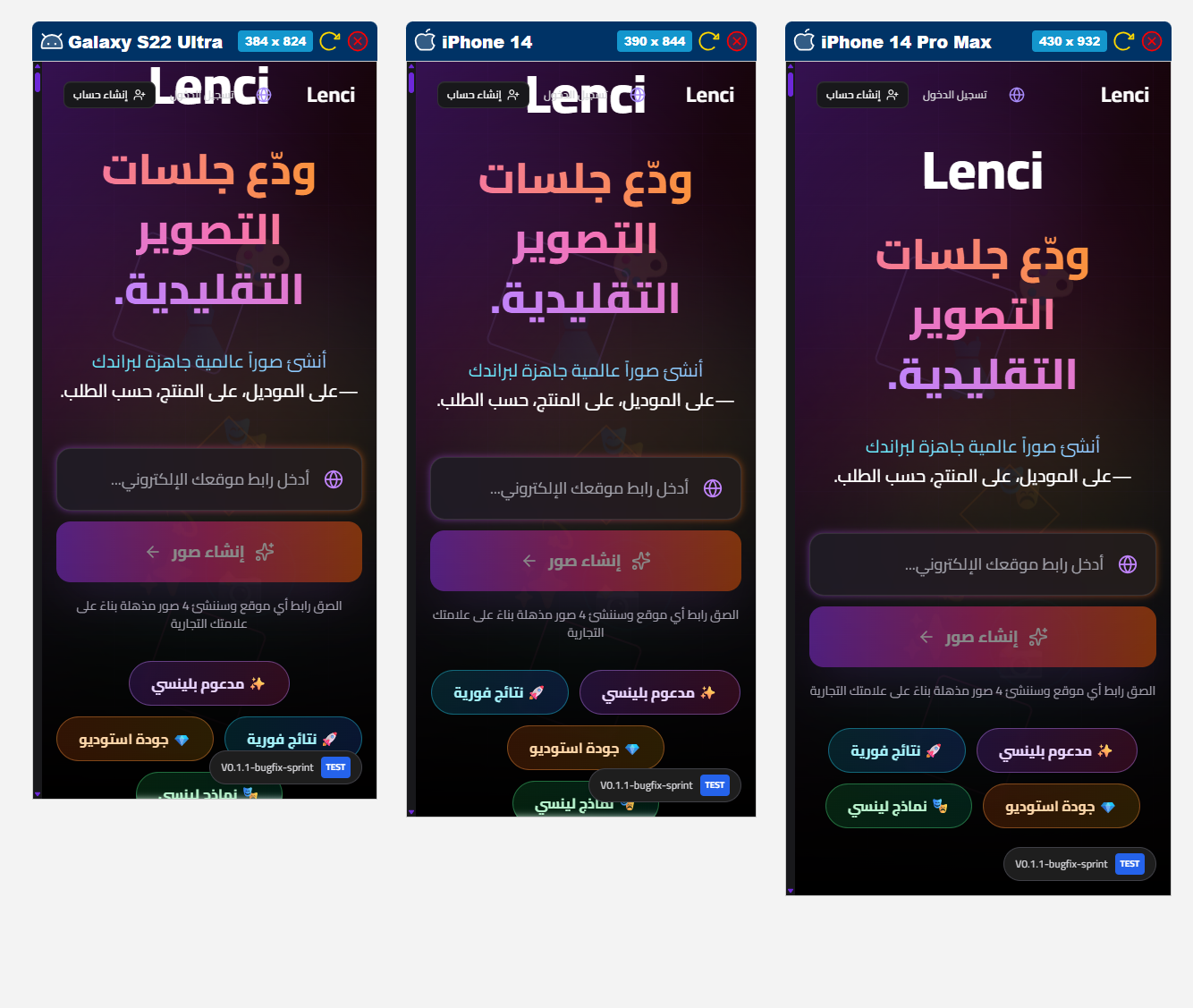
Issue Description On some mobile viewports, the Lenci logo overlaps/interacts with the transparent header (top navigation area). The header content (logo + actions like “إنشاء حساب/تسجيل الدخول” and icons) appears to collide with the hero/brand area, causing visual overlap, clipping, or stacking conflicts. This is inconsistent across devices (e.g., Galaxy S22 Ultra vs iPhone 14/14 Pro Max), which suggests responsive breakpoints/safe-area/header height rules aren’t stable. Expected Behavior The header area (logo + actions) should remain self-contained with predictable height and spacing. The hero content (logo/heading) should start below the header and never overlap with it. On all mobile sizes, the logo and header elements should be fully visible and not clipped, including devices with notches/safe areas. Acceptance Criteria On the listed mobile sizes (Galaxy S22 Ultra 384×824, iPhone 14 390×844, iPhone 14 Pro Max 430×932), the header and hero content do not overlap. The header maintains a consistent minimum height and the page content below has enough top padding/margin to clear it. The logo in the header is fully visible (no clipping), and the header actions/icons remain clickable with no element covering them. Scrolling does not cause the header to “jump” into the hero area or change stacking order unexpectedly. Works correctly with RTL (Arabic) and respects safe-area insets (notch) without elements touching/colliding with the screen edges.
Screenshots & Video
Description
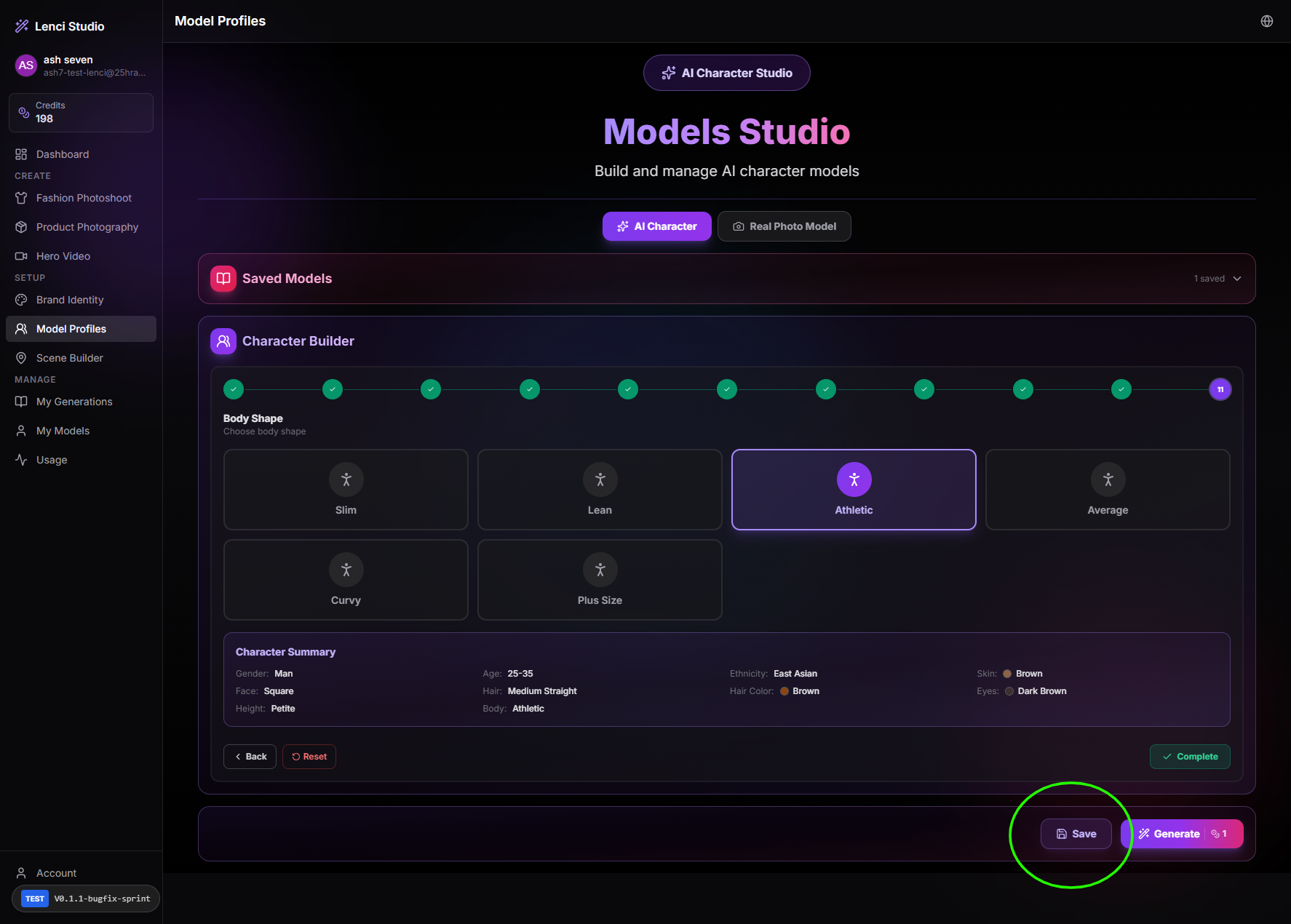
Issue Description In Models Studio → Character Builder, the Save button is enabled even when the user has not generated a model yet (no generated output to persist). This allows users to attempt saving an incomplete/invalid model state, which can cause confusion (“what did I save?”) and increases the chance of empty/placeholder records being created. Expected Behavior Save should be disabled by default while the model has not been generated. Save becomes enabled only after a successful generation exists (i.e., there is a generated model output/preview tied to the current configuration). If generation fails or is cleared/reset, Save returns to disabled. Acceptance Criteria On initial entry to Models Studio (no generation performed), Save is disabled (visually + functionally). Clicking Save while disabled is impossible (no action, no API call). After the user clicks Generate and generation succeeds (generated model output exists), Save becomes enabled. If the user clicks Reset, changes the character parameters in a way that invalidates the last generated result, or removes the generated output, Save becomes disabled again until a new successful generation occurs. Save always persists the latest successfully generated model (not just the form selections).
Screenshots & Video
Issue URL
https://test-lenci.siyadatech.studio/Description
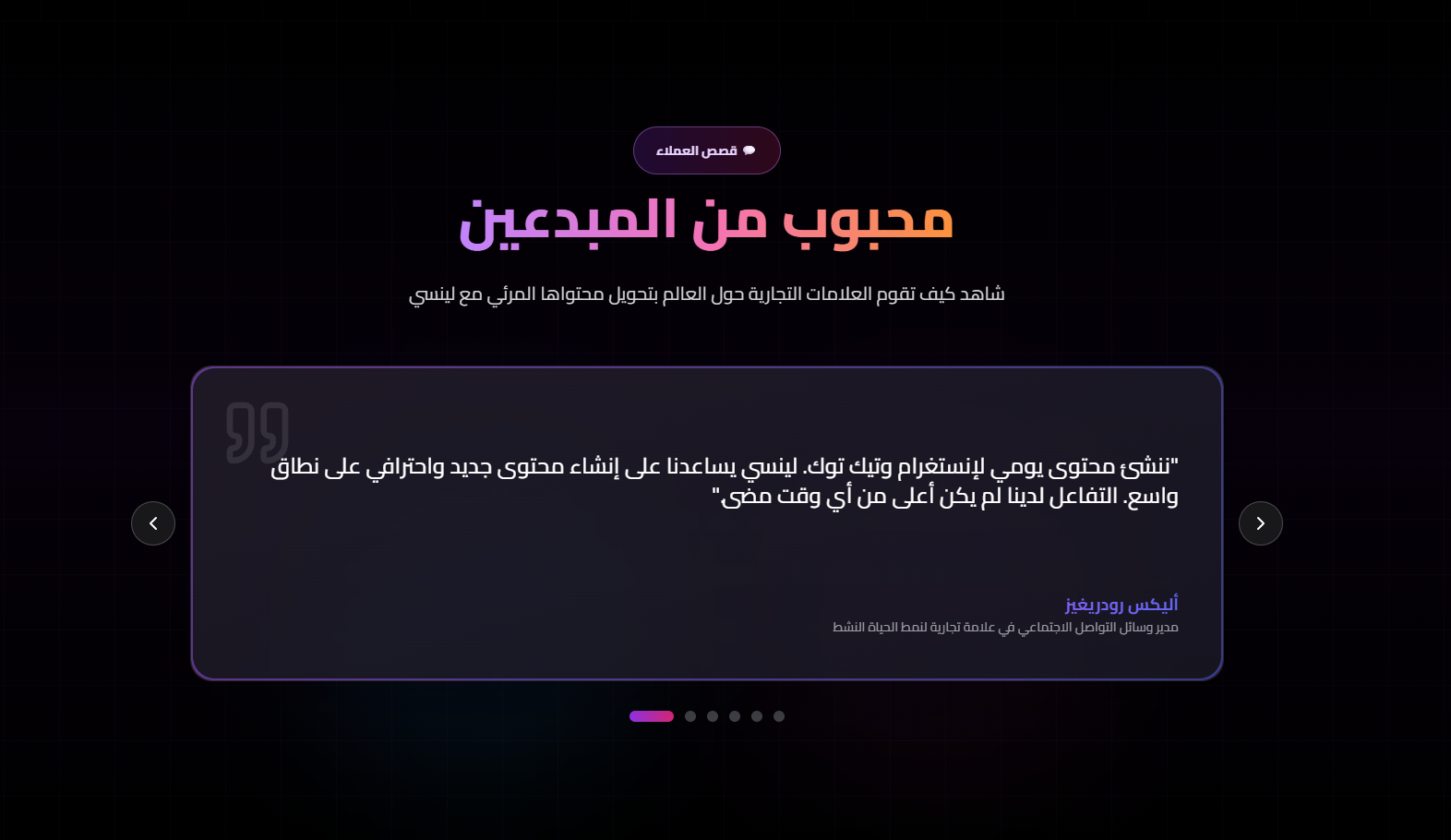
Issue Description In the Arabic (RTL) version of the landing page testimonial slider, the pagination indicators (dots) start from the left side instead of the right side. This creates an inconsistency with RTL layout expectations, where visual progression and indexing should begin from the right. The active slide indicator currently appears aligned to LTR logic rather than RTL logic. Expected Behavior When the website language is set to Arabic (RTL): Slider pagination indicators should be aligned and ordered from right to left. The first slide should correspond to the rightmost dot. Progression between slides should visually move from right → left. Indicator behavior should feel native to RTL reading direction. Acceptance Criteria In Arabic mode, the pagination dots are visually rendered starting from the right. The active dot for slide #1 is the rightmost indicator. Navigating forward moves the active indicator toward the left. Switching back to English (LTR) restores left-to-right indicator order. No layout shifting or misalignment occurs during language switching.
Screenshots & Video
Issue URL
https://test-lenci.siyadatech.studio/Description
Issue Description When loading the Landing Page (unauthenticated state), the console logs show initialization of application-level services that are unrelated to the marketing page: [PerformanceService] Initialized [PerformanceService] Auto-initialized, session: ... [AuthContext] Initializing authentication... [AuthContext] No active session found [PerformanceService] Skipping sync ... (Supabase migration - not persisted) This indicates that: Authentication logic and internal performance tracking services are being initialized on a public marketing route. Internal app services are executing even when the user is not inside the authenticated application. The landing page is not isolated from app-level service initialization. While not a crash, this creates unnecessary console noise and suggests architectural leakage between public and app layers. Expected Behavior When visiting the Landing Page (public route): No authentication initialization logs should appear. No app-level services (e.g., PerformanceService, credit services, migration sync) should initialize unless explicitly required for the landing page. Console should remain clean in a normal (non-debug) environment. Public marketing routes should operate independently of authenticated application logic. Acceptance Criteria Visiting the landing page while logged out: No AuthContext initialization logs appear. No PerformanceService initialization logs appear. No migration-related “Skipping sync” logs appear. Auth services initialize only when entering authenticated app routes. Performance tracking (if global) does not log migration or internal app sync messages on public pages. Console remains free of non-critical operational logs in production mode.
Console Output
api-CTSVC-i9.js:1 [PerformanceService] Initialized
api-CTSVC-i9.js:1 [PerformanceService] Auto-initialized, session: session_1772060806757_744iklrg5
creditHistoryService-Qs2rnbBE.js:1 🚀 [AuthContext] Initializing authentication...
creditHistoryService-Qs2rnbBE.js:1 ⚠️  [AuthContext] No active session found
api-CTSVC-i9.js:1 [PerformanceService] Skipping sync of 2 metrics (Supabase migration - not persisted)
api-CTSVC-i9.js:1 [PerformanceService] Skipping sync of 1 metrics (Supabase migration - not persisted)
api-CTSVC-i9.js:1 [PerformanceService] Skipping sync of 1 metrics (Supabase migration - not persisted)
Description
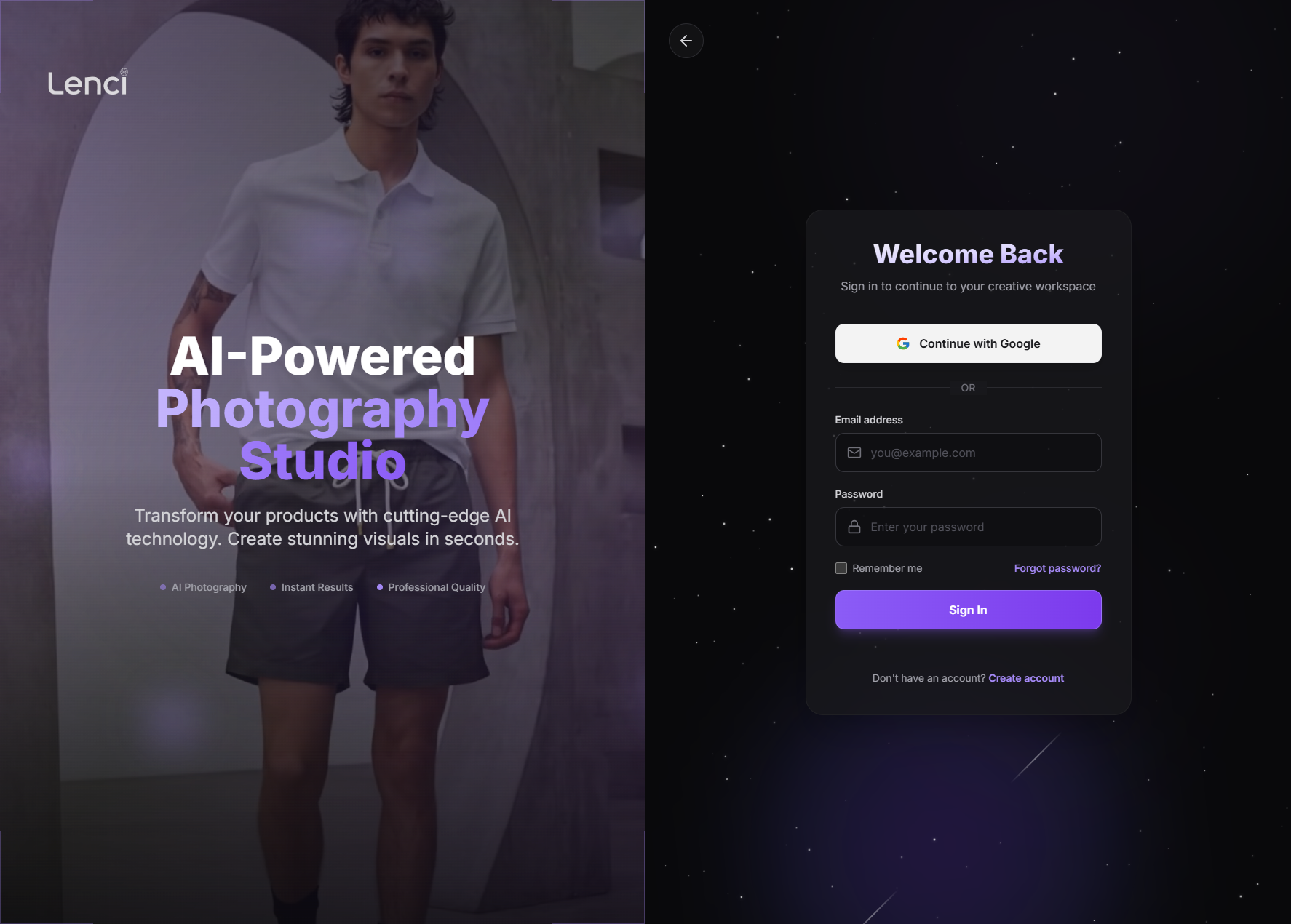
Issue Description After logging out, the app correctly routes to the Login screen, but it still loads the Landing Page (marketing) assets in the background (hero image/landing layout resources). Those landing assets include missing files, which results in multiple 404s + console errors on a page that should be “clean” (login only). This creates: Noisy console (hard to debug real auth issues) Slower login page load (unnecessary network + render work) A “broken” impression (missing assets/errors visible in devtools) Risk of layout flicker if landing CSS/images are partially applied Expected Behavior On logout → redirect to /login: Only auth/login JS/CSS/images should load. Landing/marketing bundles should not be requested at all. Console should be error-free (no missing asset spam). The login route should be fully isolated from landing page layout/components. Implementation Recommendations 1) Fix routing/layout composition (most common root cause) Likely cause: The login route is still rendered inside the same “Marketing/Landing Layout” wrapper (or a shared AppShell) that imports landing assets. Recommended structure: PublicMarketingLayout → only for /, /pricing, /about, etc. AuthLayout → only for /login, /signup, /forgot-password AppLayout → only for authenticated app routes Make sure /login is not a child of the marketing layout in your router tree. ✅ Result: landing bundles won’t be imported, so assets won’t load. 2) Prevent “global” landing asset imports Check for: import './landing.css' inside a global entry (App.tsx, main.tsx, root layout) Background hero images referenced in global CSS (e.g., body { background-image: url(...) }) A landing component imported by the login page “just for shared UI” Fix: Move landing-only CSS/images into: landing route chunk only, or CSS modules scoped to landing component, or lazy-loaded import in landing page component. 3) Stop preloading/prefetching landing resources on logout/login Even if layout is correct, you might be explicitly prefetching: rel="preload" / rel="prefetch" tags framework route prefetch (Next/router prefetch, React Router data prefetch, etc.) service worker caching/prefetch logic Fix options: Disable route prefetch for landing from auth routes Only prefetch marketing routes when user is actually on marketing pages 4) Handle logout transition cleanly (avoid “old page still alive” effects) If logout just clears token but keeps app mounted, the previous route may keep running effects that load assets. Best practice flow: await logout() (server revoke if applicable) Clear auth state + caches navigate('/login', { replace: true }) Hard reset any marketing/app specific state if needed Also ensure any landing/marketing components are unmounted completely. 5) Fix the missing assets (secondary, but still needed) Even after isolating login, you should still fix the broken landing assets: Missing files should not exist in production builds Validate paths/case-sensitivity (Linux deploys will 404 on case mismatch) Ensure assets are included in build output and correct base path (PUBLIC_URL, base, assetPrefix) Quick Debug Checklist (fast way to pinpoint) Open DevTools → Network → filter by img, css, js Logout → watch what loads If you see landing bundles: route/layout issue If you see only login bundle but hero images: global CSS background or preload tags If assets request URLs look wrong (/assets/... vs /app/assets/...): base path/config issue
Console Output
login.html?force=1:1 [DOM] Input elements should have autocomplete attributes (suggested: "current-password"): (More info: https://goo.gl/9p2vKq) <input placeholder="Enter your password" required aria-invalid="false" class="w-full p-3.5 ps-12 rounded-xl bg-zinc-950/50 text-zinc-100 border transition-all duration-200 placeholder:text-zinc-600 hover:border-zinc-600 border-zinc-700/80 focus:ring-2 focus:ring-violet-500/50 focus:border-violet-500" type="password" value> login.html?force=1:40 GET https://test-lenci.siyadatech.studio/assets/product-showcase/product-4.jpg 404 (Not Found) login.html?force=1:40 GET https://test-lenci.siyadatech.studio/assets/product-showcase/product-5.jpg 404 (Not Found)
Screenshots & Video
Description
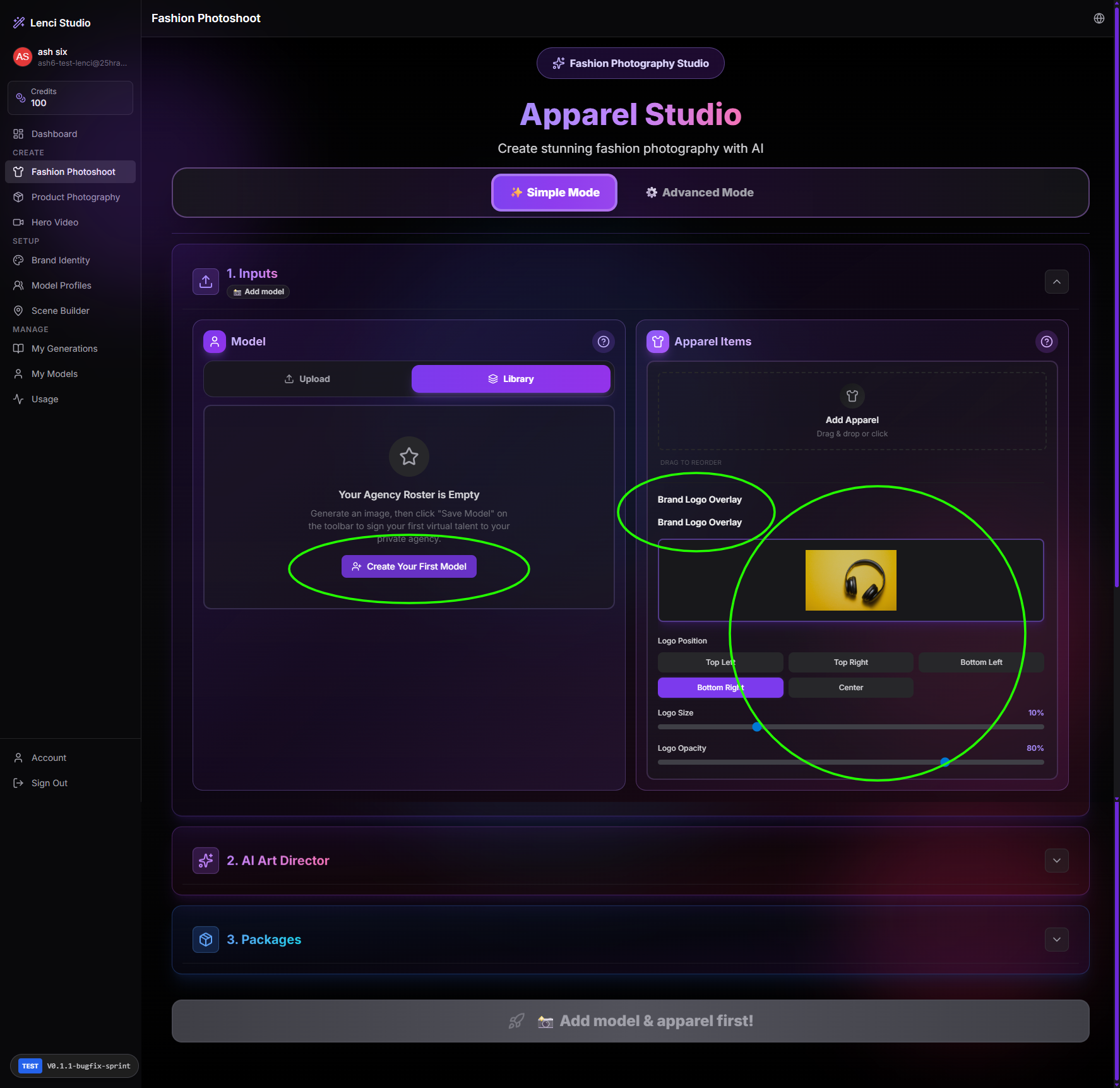
user: ash6-test-lenci@25hraf.com 1) “Create Your First Model” button does nothing Issue Description In Inputs → Model → Library (empty state: “Your Agency Roster is Empty”), clicking Create Your First Model produces no navigation, modal, or action. This is a dead-end CTA on the primary empty-state path, so a new user cannot recover without guessing where to go next. Expected Behavior When the roster is empty, Create Your First Model should reliably take the user to the model-creation flow, for example: Navigate to Model Profiles / Models Studio (or whatever the canonical “create model” page is), or Open an in-place modal/wizard to upload a model photo and save it as a model. If the feature is gated (credits/permissions), the button should show a clear message explaining why + next step. Implementation Recommendations Wire the CTA to a single canonical action: navigate('/models/new') or navigate('/models-studio?source=apparel_empty') Or openCreateModelModal({ source: 'apparel_library_empty' }) Add guardrails: If route doesn’t exist / API unavailable, show toast: “Couldn’t open model creator. Please try again.” (not silent fail) Add instrumentation: Log click + result (navigated / modal opened / error) to catch regressions. QA checklist: Works in Simple/Advanced mode, desktop/mobile, and for brand-new accounts with no models. 2) “Brand Logo Overlay” label is duplicated Issue Description In Apparel Items → Brand Logo Overlay, the text “Brand Logo Overlay” appears twice (stacked). This looks like a UI rendering bug (duplicate header/label) and reduces trust/visual polish. Expected Behavior The label should appear once, as either: A section header (“Brand Logo Overlay”), and below it the controls, or A form label tied to the upload/control group. Implementation Recommendations Inspect component tree: likely two sources rendering the same string: Section header component + form field label Or translated key rendered twice (e.g., <SectionTitle /> and <FieldLabel />) Fix by: Removing one label, or Converting one into a smaller helper text (“Optional — apply logo watermark to outputs”) Add UI snapshot test (or simple regression test) to ensure only one instance exists. 3) New account already has a logo preloaded Issue Description On a new account, the Brand Logo Overlay area already contains a logo asset and settings (position/size/opacity). That implies state leakage or unintended default seeding, which is confusing and may be a privacy/compliance risk if assets can come from another tenant/user. Expected Behavior For a brand-new account: Brand logo overlay should be empty by default (no asset selected). If you intentionally provide a starter/demo logo, it must be clearly labeled as “Sample” and removable, and must not be a real user asset. Assets shown must always be scoped to the current tenant/user only. Implementation Recommendations Verify data scoping: Ensure logo queries use tenant_id / org_id and (if needed) user_id filters. Confirm CDN/storage paths are tenant-scoped (no shared “default” bucket without tenant prefix). Check client-side caching: If you store “last used logo” in localStorage/sessionStorage, make sure keys are namespaced by tenant + user, and cleared on logout/switch account. Check server defaults/seeding: If your onboarding seeds a default brand, ensure it seeds only metadata or a true system sample, not a reused asset reference. Add a safety UI: Show a “Clear logo” / “Reset overlay” action. Add QA test: Create a new tenant → confirm no brand assets exist and overlay is empty.
Console Output
api-CTSVC-i9.js:1 [PerformanceService] Initialized
api-CTSVC-i9.js:1 [PerformanceService] Auto-initialized, session: session_1772058628288_9i4nsl5pt
creditHistoryService-Qs2rnbBE.js:1 🚀 [AuthContext] Initializing authentication...
creditHistoryService-Qs2rnbBE.js:1 ✅ [AuthContext] Session found for user: bacem@siyada.tech
creditHistoryService-Qs2rnbBE.js:1 🔍 [AuthContext] Fetching profile for user: bacem@siyada.tech f4388659-fe87-4f62-b096-76a9d5686634
creditHistoryService-Qs2rnbBE.js:1 ✅ [AuthContext] User profile loaded from API: {id: 'f4388659-fe87-4f62-b096-76a9d5686634', email: 'bacem@siyada.tech', email_verified: true, display_name: 'Admin', avatar_url: null, …}
creditHistoryService-Qs2rnbBE.js:1 📊 [AuthContext] Final user profile: {id: 'f4388659-fe87-4f62-b096-76a9d5686634', email: 'bacem@siyada.tech', plan: 'enterprise', generationsUsed: 0, creditsBalance: 4071}
creditHistoryService-Qs2rnbBE.js:1 ✅ [AuthContext] User profile set in state
creditHistoryService-Qs2rnbBE.js:1 [WS] Connected
main-D8GZT5ux.js:9878 [AutoSave] Draft restored for apparel
api-CTSVC-i9.js:1 [PerformanceService] Skipping sync of 9 metrics (Supabase migration - not persisted)
Screenshots & Video